Media & Images
Optimize images for the web: formats, rights, metadata and load time
Images are the biggest transfer block on most websites, and they decide more than load time: accessibility, privacy and cease-and-desist risk. Embedding a camera original with 4,000 pixels and 5 MB into a website is only the most visible mistake. This guide walks the complete path from photo to delivered file: clear the rights, check the metadata, crop, compress, embed correctly and describe. Every step links the matching free tool, everything runs in the browser without uploads.
Rights first: where may your image come from?
Before formats and kilobytes, comes the question chain that decides every image use: who made the image, where does the file come from, which concrete license applies, and are all conditions met? An image appearing in Google Image Search is not free to use because of that. Copyright protects photographs regardless of where they are findable, and publishing on a website needs a proper rights basis.
The common Creative Commons variants compared:
| License | Commercial use | Attribution | For ad-funded websites |
|---|---|---|---|
| CC0 | Without additional permission | Not required, still document provenance internally | Suitable basis if the rights chain is plausible |
| CC BY | Allowed if conditions are met | Required: author, license with version, source link | Usable with a careful image credit |
| CC BY-SA | Allowed if conditions are met | Like CC BY, plus ShareAlike for distributed adaptations | Usable, clarify the ShareAlike scope per case |
| CC BY-NC and other NC variants | Not without separate permission | Attribution does not lift NC | Exclude: advertising targets commercial advantage |
Two clarifications prevent false conclusions. First: not every Commons image is CC0, Wikimedia mixes CC0, public domain works and various free licenses, the check always applies to the individual file description page. Second: ShareAlike concerns a distributed adaptation, not automatically every compilation, and a simple crop for layout purposes is not in every case a legal adaptation.
What a cease-and-desist letter can cost is shown by a concrete BGH ruling: in the so-called sports car photo judgment of 13 September 2018, besides the license analogy of 100 euros there was an additional 100 euros for missing attribution, a surcharge of 100 percent. That is one ruling, not a price list. Further practice points: do not sign pre-formulated cease-and-desist declarations with contractual penalties unchecked, law firms cite amounts from 5,001 euros as examples, and removing the image from the article does not automatically settle an injunction claim. When a letter arrives: secure the letter and deadline, have license evidence checked, do not ignore it and do not pay blindly.
For every used image, a small internal record pays off: source, author, concrete license with version, retrieval date, permitted uses. CC0 does not require attribution, but document the provenance anyway, because the release by the actual rights holder is no guarantee, and the Commons platform itself assumes no warranty for every license statement.
Metadata: what is inside a photo file

A photo is more than its visible content. The EXIF standard, in the current version 3.1 from January 2026, defines fields for camera make and model, capture time, GPS latitude and longitude, GPS altitude and even device and lens serial numbers. On top come XMP and IPTC structures with descriptions, keywords, depicted persons and rights notices. Not every field is filled in every file, but the risks are concrete:
| Field group | What it can contain | Risk when publishing |
|---|---|---|
| GPS coordinates | Capture location with direction, altitude, timestamp | Can narrow down home or workplace to a few meters, GPS.gov cites a typical 4.9 meter radius for smartphones under open sky |
| Device and software | Camera model, possibly serial numbers, editing programs | Links files together and reveals the equipment |
| Capture time | Date and time with timezone offset | Suggests daily routines and stays |
| Embedded preview | Small thumbnail in the file header | Can show content that is no longer visible after cropping |
| IPTC fields | Persons, places, rights notices | Can name children, facilities or clients, even without GPS |
The scenarios are everyday cases: a bicycle or jewelry photo for a classified ad can reveal the storage location via GPS, a home-office desk photo can narrow down the home address, children's photos can make daily routines recognizable through recurring location and time data. And a cropped photo can still contain the original content through the embedded preview, Apple explicitly documents a sharing option that transmits the original including editing history.
What platforms and built-in tools do, and what they do not. The IPTC platform test of 2019 showed removed metadata in saved output images for Twitter and a largely removed set with remaining rights fields for Facebook. That is a historical test, not a guarantee for every export path. The reliable finding is the opposite direction: a 2025 forensic study found complete EXIF preservation including identical file hashes for document-based transfer paths and direct email delivery. Anyone sending a photo as a file attachment transmits the metadata with it.
The built-in tools are partial solutions. On the iPhone, the share menu under Options switches off location, camera model and capture time remain in the file anyway. On Android, the camera app disables location tags, the setting name is vendor-dependent, Google documents Save location on its own devices and Location tags on Samsung. The Windows Explorer path via Properties and Remove Properties is not to be recommended as a complete cleanup after a 2022 investigation by Didier Stevens, the EXIF directory entries disappeared, but associated strings still sat in the data block. macOS Preview removes location data specifically, documented is that not as a full-delete mode.

The reliable way: before publishing, check the concrete file, then clean it deliberately. The Image Metadata Inspector shows what is in the file, GPS, camera data, timestamps. The Image Metadata Cleaner removes EXIF, XMP and ICC data without recompression for JPEG, PNG and WebP and reads HEIC and AVIF files. Then check the exported file again, not just the preview. One boundary case belongs here: section 95c of the German Copyright Act protects electronic rights-management information, so with third-party images do not delete rights notices unchecked.
A newer development on the side: the C2PA standard for Content Credentials cryptographically signs provenance and editing information and works together with EXIF, IPTC and XMP. Provenance becomes more verifiable, but provenance is not truth, and the removable embedding is not the whole system.
Formats 2026: WebP as default, AVIF as option, JPEG as fallback
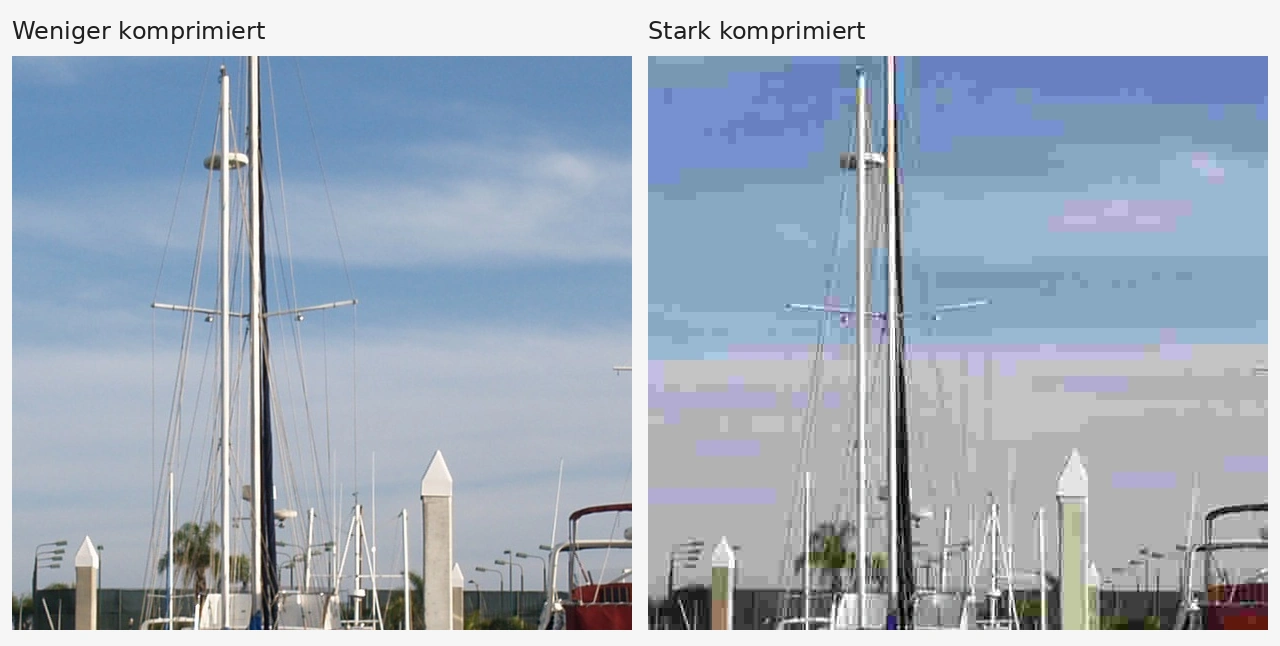
The format question is no longer a matter of belief in 2026, but a trade-off of file size, browser support and encoding effort. The baseline numbers:
| Format | Savings vs JPEG | Browser support | Typical use |
|---|---|---|---|
| WebP | about 25 to 34 percent lossy, about 26 percent lossless vs PNG | 97.18 percent | Photos, screenshots, transparent graphics, short animations |
| AVIF | about 50 percent median (MDN cites a benchmark with matched DSSIM) | 96.35 percent | Detail-rich photos, HDR, transparency |
| JPEG XL | lossless JPEG transcoding possible | 60.19 percent, partially supported | Watch, not yet a default |
| HEIC | roughly half the size of JPEG | 16.93 percent, Safari only | Not a web delivery format |
| SVG | vector, no pixels | established | Logos, icons, diagrams |
| PNG | lossless, larger | very broad | Screenshots with text, lossless intermediates |
Three classifications that make many guides outdated. First JPEG XL: the statement practically dead for the web is outdated, Chrome decodes JPEG XL by default from version 155, Mozilla from Firefox 158, Safari has partially supported since version 17, Edge remains excluded up to and including 155. For Google Image Search, JPEG XL is nevertheless not in the supported formats list. Second AVIF: half the file size is a median from an older benchmark, not a promise for every file, and in a small benchmark from October 2026 some subjects came out larger with AVIF than with WebP. Encoding time there was 7.6 times higher than WebP in the median, one-time creation and caching relativize that. Third the Google formats list: Image Search supports BMP, GIF, JPEG, PNG, WebP, SVG and AVIF, documented in the image SEO page with the German version dated 4 March 2026. HEIC and JPEG XL are missing there.
The compression practice condenses into five rules:
- Crop and resize first, then compress. Pixel dimensions follow the display width in the layout, not the camera. The Image Resizer resizes, crops and rotates.
- Work losslessly until the subject is finished. Each repeated lossy encoding can accumulate losses. Create every web variant from the original or a lossless master, not from the previous export. Optional editing steps are bundled with the Image Filters before the final export.
- Test quality 75 to 85 as a starting range. The number is not a quality percentage and not comparable across formats. For AVIF, do not simply copy the JPEG or WebP value.
- Really look at the output. Check sky, skin, hair, small text and transparent edges for blocking, banding and fringing. A met KB budget proves nothing about quality.
- Convert iPhone photos first. HEIC is not a cross-browser web format, the Image Converter accepts HEIC and produces web-suitable outputs.
The Image Compressor runs directly in the browser, uploads nothing and exports JPEG, PNG and WebP. Two limits stated honestly: there is no guaranteed target size, and AVIF export is not included. Anyone who wants to test AVIF needs an additional tool, and then checks the output again with the same eyes.
Realistic file size targets as working values, not Google rules:
| Use | Output width | Target budget |
|---|---|---|
| Hero or title image | around 1,920 pixels | under 200 to 300 KB |
| Content image in text | around 1,200 pixels | under 150 KB |
| Thumbnail or tile | 400 to 600 pixels | under 50 KB |
The values come from vendor guides, TinyThis cites the pixel and KB ranges, Shopify cites 200 KB or less as a rule of thumb for finished web images. Two additions: on retina displays the source width doubles for the same CSS width, Shopify cites 400 by 400 pixels for a 200 by 200 CSS pixel field as an example, that concerns pixel dimensions, not automatically kilobytes. And a subject with fine vegetation needs more data at equal dimensions than a calm surface, the budget is a target, not a promise.
For the format basics across all file types, from CSV to MP4, the handbook has a dedicated article on data formats.
Embedding correctly: space reservation, loading behavior and priority

The embedding decides whether an optimized image also yields a fast page. Three attribute groups, three different jobs:
| Attribute | Job | Most common mistake |
|---|---|---|
| width and height | Provide the aspect ratio before the image loads and reserve space against layout shifts | Omitting them because CSS controls the size |
| loading="lazy" | Delays loading of images below the initial viewport | Putting it on the LCP image |
| fetchpriority="high" | Raises the loading priority of the likely LCP image | Setting it on all images indiscriminately |
On width and height, the precise situation: the HTML dimensions are the robust default recommendation, web.dev names CSS aspect-ratio explicitly as an alternative for space reservation. A ratio deviating from the original then needs object-fit against distortion. For normal content images the rule still holds: set both HTML attributes, plus the responsive CSS rules max-width and height auto.
On loading behavior, the clear separation: lazy loading belongs on images further down, never on the likely LCP image, a smaller image still arrives late when it is requested late. web.dev documents Fetch Priority with a Google Flights test improving LCP from 2.6 to 1.9 seconds, a historical experiment, not a guaranteed effect on every website. decoding="async" is a hint that other content need not wait for the image decode, not an LCP guarantee.
One stumbling block for image search: Google indexes only images reachable via the src attribute of an img element, including inside picture. CSS background images are not indexed and receive no native lazy loading via the HTML loading attribute. For images that should be findable in Google Images, the rule is: img tag with a real src URL.
With responsive images, srcset describes the actual pixel width of the source files, while sizes describes the expected display width in the layout. Missing sizes makes the browser assume 100vw, the full window width, which leads to unnecessarily large downloads for narrower content images. In PageSpeed Insights, the earlier checks Properly size images and Serve images in next-gen formats have been merged since Lighthouse 13 into the Improve image delivery insight, field data covers the last 28 days.
Alt text: one attribute, two jobs
Alt text serves people who cannot see the image, and search engines classifying the subject. WCAG 1.1.1 requires purpose-appropriate text alternatives, Google uses the alt text together with computer vision and page context. The W3C decision tree sorts the cases:
| Image type | Correct treatment |
|---|---|
| Informative photo | Concise description of the relevant information in alt |
| Pure decoration | Present, truly empty alt="" |
| Image as sole link | Describe the target or action, not the subject |
| Complex diagram | Short alt text plus detailed explanation in the page text |
| Inline SVG | role="img" and title instead of the alt attribute |
Writing rules with examples: describe the information, not the object. Instead of alt="photo of a tool", better alt="clamp fixing two wooden boards at a right angle". Instead of alt="before after", better a statement about the visible result, such as the frayed edges on the enlarged lettering. About 150 characters are a rule of thumb, not a technical limit. Do not start with picture of or photo of, screen readers already announce images. And no keyword lists: Google warns that keyword stuffing in the alt attribute can lead to a spam classification.
The most common mistake here is the missing attribute instead of the empty value: if you omit alt entirely, some screen readers read out the file name. Purely decorative images therefore explicitly get an empty alt="". How widespread the gaps are is shown by the Web Almanac 2024: from the rounded desktop sample values, about 15 percent of images have no alt attribute and about 30 percent an empty value, so roughly 55 percent with non-empty alt text. A non-empty value does not prove a good description, a file name as alt text also counts as non-empty.
The file name itself is a small comprehension signal: Google names my-new-black-kitten.jpg as a better example than IMG00023.JPG and describes file names as very light clues about the subject. That is not a ranking promise, but a descriptive name costs nothing.
For graphics with overlaid text or meaning-carrying icons, WCAG 1.4.11 additionally applies: at least 3:1 contrast against adjacent colors for graphic components required for understanding. The Contrast Checker tests color combinations against WCAG, and for layout planning with reserved image areas there is the Placeholder Image Generator. The Color Picker helps with color values from a subject, for example for matching captions.
Images and Core Web Vitals
Images directly affect two of the three Core Web Vitals: the Largest Contentful Paint, when the main image is requested late, transferred slowly or rendered late, and the Cumulative Layout Shift, when images loading without space reservation shift content. The target values at the 75th percentile: LCP at most 2.5 seconds, INP at most 200 milliseconds, CLS at most 0.1.
The LCP diagnosis separates four partial times: Time to First Byte, Resource Load Delay, Resource Load Duration and Element Render Delay. An isolated optimization can shift time rather than always lowering the final value. In practice: first identify the actual LCP element, then check whether it is lazy-loaded, whether its discovery comes late and whether the file is unnecessarily large. The INP, by the way, does not benefit from image optimization, it measures interaction latency, not load time.
For more depth on measurement and further levers, the handbook article Build your own website has a dedicated section on Core Web Vitals, and the Website Performance Playbook walks the tool sequence.
The complete workflow: from camera to website
All steps of this guide in an order that works as a checklist:
- Clear the rights. Check provenance, author and concrete license, four questions per image: who made it, where does the file come from, which license applies, are all conditions met?
- Check visible content. Faces, license plates, documents, screen contents: effectively obscure whatever should not be public. The Censor Image editor pixelates or blackens deliberately. Separate the two protection layers: pixelating changes no metadata, removing metadata changes no pixels.
- Check and clean metadata. Look inside with the Image Metadata Inspector, GPS, camera data, timestamps. Then clean with the Image Metadata Cleaner and check the exported file again.
- Crop and resize. Determine the display width in the layout, choose matching pixel dimensions, implement with the Image Resizer. Plan double source width for retina.
- Finish optional editing. Bundle brightness, effects and filters before the final export, with the Image Filters.
- Choose format and compress. Convert HEIC first with the Image Converter, then compress to WebP or JPEG with the Image Compressor. Quality 75 to 85 as a starting range, compare the output with the original.
- Check file size against the target budget. Hero under 200 to 300 KB, content image under 150 KB, thumbnail under 50 KB, as guidance values, not boundary laws.
- Embed with width, height and matching loading behavior. Set space reservation, do not lazy-load the LCP image, use loading="lazy" for images further down.
- Set alt text and file name. Describe informatively, decorate with empty alt="", no keyword lists.
- Measure in the browser. Check in the developer tools which file is actually loaded, and scroll the page once completely, even lazy-loaded images can cause layout shifts.
For the guided processing of a single image, the Image Workflow Playbook walks the four steps filter, size and crop, convert and compress, all in the browser without uploads.
Common mistakes in image optimization
- Embedding the camera original. 4,000 pixels and 5 MB for an 800-pixel layout field is wasted transfer.
- Lazy-loading the LCP image. A smaller image still arrives late when it is requested late.
- Omitting alt attributes instead of emptying them. Decorative images need a present, empty alt="", otherwise screen readers read file names.
- Keyword lists as alt text. Google warns of spam classification, description beats keyword density.
- GPS coordinates in classified-ad photos. The location switch when sharing is a start, still check the exported file.
- Trusting Windows Explorer cleanup as a complete solution. The 2022 investigation shows leftover data in the data block, check the exported file.
- NC images on ad-funded sites. Attribution does not lift the non-commercial condition.
- Google Image Search as an image source. Findable is not licensed, the rights chain always comes first.
- Assuming AVIF halves every file. The median from a benchmark is no per-subject promise, measure the output.
- Treating JPEG XL as a web standard. The browser situation improved markedly in 2026, the Google formats list still does not include it.
- Checking only the KB number. Blocking artifacts, banding and smeared text are seen in the image, not in the file manager.
- CSS background images as content images. They are not indexed in Google Images and get no native lazy loading.
Frequently asked questions about images for the web
The most important questions from practice, answered briefly and with the state of research.
[The FAQ answers are in the FAQ block at the top of this page.]
If you want to go deeper on privacy: the guide Services without an account explains why local browser tools like the image tools of studio-tools work privacy-consciously, and the article Build your own website places images in the full launch context.
Frequently asked questions
Which image format is right for my website in 2026?
Is AVIF really always smaller than WebP?
How many kilobytes may an image for my website have?
Should I lazy-load all images?
What belongs in an image's alt text?
Does every smartphone photo contain my device's serial number?
Is switching off location when sharing on iPhone enough?
May I use images from Google Image Search on my website?
May I use a CC BY-NC image on a website with advertising?
Are all images on Wikimedia Commons CC0?
Why does my compressed screenshot look blurry?
Which quality setting should I choose when compressing?
All figures are directly read documentation statements or disclosed third-party measurements as of 23 October 2026, not our own tool tests and not market averages. Browser shares change continuously. Tool descriptions follow the verified functions of the studio-tools tools.
Sources & status of these figures
Research verified on 23 October 2026. Format statements follow the Google Search Central, MDN and web.dev documentation, browser shares Can I Use, legal texts gesetze-im-internet.de, license questions Creative Commons and Wikimedia Commons. Third-party measurements are marked as such. Sources appear only in this source block.
- Google: WebP compression study, 25 to 34 percent smaller than JPEG at comparable SSIM, verified 23 Oct 2026. https://developers.google.com/speed/webp/docs/webp_study
- Google: WebP overview and FAQ, 16,383 pixel format limit, verified 23 Oct 2026. https://developers.google.com/speed/webp
- Google Search Central: image SEO guide, supported formats BMP, GIF, JPEG, PNG, WebP, SVG, AVIF, English version updated 02 Mar 2026, verified 23 Oct 2026. https://developers.google.com/search/docs/appearance/google-images
- MDN: image file types and uses, AVIF about 50 percent smaller than JPEG (median, CTRL blog benchmark), verified 23 Oct 2026. https://developer.mozilla.org/en-US/docs/Web/Media/Guides/Formats/Image_types
- Can I Use: WebP 97.18 percent, AVIF 96.35 percent, JPEG XL 60.19 percent, HEIC 16.93 percent, as of 23 Oct 2026. https://caniuse.com/webp
- Chrome for Developers: JPEG XL decodable by default from Chrome 155, announcement 06 Oct 2026, verified 23 Oct 2026. https://developer.chrome.com/blog/jpeg-xl-in-chrome
- MDN: Firefox 158 release notes, JPEG XL by default from 13 Oct 2026, verified 23 Oct 2026. https://developer.mozilla.org/en-US/docs/Mozilla/Firefox/Releases/158
- web.dev: Learn Images, compression, formats and automated derivatives, verified 23 Oct 2026. https://web.dev/learn/images
- web.dev: Optimize CLS, width and height for space reservation, verified 23 Oct 2026. https://web.dev/articles/optimize-cls
- web.dev: Serve images with correct dimensions, CSS aspect-ratio as an explicit alternative, verified 23 Oct 2026. https://web.dev/articles/serve-images-with-correct-dimensions
- web.dev: browser-level lazy loading, do not delay the LCP image, verified 23 Oct 2026. https://web.dev/articles/browser-level-image-lazy-loading
- web.dev: Fetch Priority, Google Flights test LCP 2.6 s to 1.9 s, verified 23 Oct 2026. https://web.dev/articles/fetch-priority
- web.dev: Core Web Vitals, LCP 2.5 s, INP 200 ms, CLS 0.1 at the 75th percentile, verified 23 Oct 2026. https://web.dev/articles/vitals
- Chrome for Developers: Lighthouse 13, image checks merged into the Improve image delivery insight, verified 23 Oct 2026. https://developer.chrome.com/blog/lighthouse-13-0
- W3C WAI: decision tree for text alternatives, verified 23 Oct 2026. https://www.w3.org/WAI/tutorials/images/decision-tree/
- W3C WAI: tips on alt text, concise description, no 'image of', verified 23 Oct 2026. https://www.w3.org/WAI/tutorials/images/tips/
- Web Almanac 2024: accessibility chapter, figure 8.23, about 15 percent without alt attribute, about 30 percent empty, desktop sample, verified 23 Oct 2026. https://almanac.httparchive.org/en/2024/accessibility
- CIPA: EXIF standard DC-008-Translation-2026, version 3.1, published 30 Jan 2026, verified 23 Oct 2026. https://cipa.jp/e/std/std-sec.html
- Apple Support: manage location metadata in Photos, verified 23 Oct 2026. https://support.apple.com/guide/personal-safety/manage-location-metadata-in-photos-ips0d7a5df82/web
- Apple Support: share photos and videos, shared metadata, verified 23 Oct 2026. https://support.apple.com/guide/iphone/share-photos-and-videos-iphf28f17237/ios
- Google Support: camera location settings on Android, vendor-dependent names, verified 23 Oct 2026. https://support.google.com/photos/answer/9921876
- Didier Stevens: Windows Explorer improper EXIF data removal, leftover data in the APP1 block, 08 Feb 2022, verified 23 Oct 2026. https://blog.didierstevens.com/2022/02/08/windows-explorer-improper-exif-data-removal/
- IPTC: Social Media Sites Photo Metadata Test Results 2019, Facebook and Twitter compared, verified 23 Oct 2026. https://www.iptc.org/standards/photo-metadata/social-media-sites-photo-metadata-test-results-2019/
- Forensic Value of Exif Data, 2025, DOI 10.70322/plfs.2025.10006, document-based and email transfer preserves EXIF and file hashes, verified 23 Oct 2026. https://doi.org/10.70322/plfs.2025.10006
- C2PA: Content Credentials FAQ, cooperation with EXIF, IPTC and XMP, verified 23 Oct 2026. https://c2pa.org/faqs/
- UrhG full text, in particular sections 13, 95c, 97 and 97a, verified 23 Oct 2026. https://www.gesetze-im-internet.de/urhg/BJNR012730965.html
- KunstUrhG, sections 22 and 23, images of persons, verified 23 Oct 2026. https://www.gesetze-im-internet.de/kunsturhg/BJNR000070907.html
- Creative Commons: FAQ on attribution, commercial use and ShareAlike, verified 23 Oct 2026. https://creativecommons.org/faq/
- Creative Commons: CC0 1.0 summary, verified 23 Oct 2026. https://creativecommons.org/publicdomain/zero/1.0/deed.en
- Wikimedia Commons: reusing content outside Wikimedia, per-file checks and further rights, verified 23 Oct 2026. https://commons.wikimedia.org/wiki/Commons:Reusing_content_outside_Wikimedia
- BGH, judgment of 13 Sep 2018, I ZR 187/17, sports car photo, surcharge for missing attribution, verified 23 Oct 2026. https://gesetze.co/urteile/I_ZR_187-17
- TinyThis: image sizes for websites, guidance hero 1,920 to 2,560 pixels under 200 to 300 KB, content 1,200 to 1,600 pixels under 150 KB, thumbnails under 50 KB, verified 23 Oct 2026. https://www.tinythis.de/ratgeber/bildgroesse-fuer-websites/
- Shopify: 10 Must-Know Image Optimization Tips, 200 KB rule of thumb and retina example 400 x 400 for 200 x 200, updated 03 Sep 2026, verified 23 Oct 2026. https://www.shopify.com/blog/7412852-10-must-know-image-optimization-tips
- Level UI: WebP vs AVIF, small vendor benchmark, median 7.6x AVIF encoding time, measured 10 Oct 2026, verified 23 Oct 2026. https://levelui.com/resources/webp-vs-avif
- Image credits for the photos used in this article (all CC0 1.0, edited): photographing, Mostafameraji, https://commons.wikimedia.org/wiki/File:Photographer1.jpg ; before-after editing, RadarStorm, https://commons.wikimedia.org/wiki/File:PebblesBeforeAndAfter.png ; compression comparison, Weedwhacker128, https://commons.wikimedia.org/wiki/File:PSNR-example-base.png ; empty picture frame, Rijksmuseum, https://commons.wikimedia.org/wiki/File:Lijst_met_glasplaat,_RP-L-530.jpg ; notebook, PxHere, https://commons.wikimedia.org/wiki/File:Notebook-writing-man-book-person-blur-1176206.jpg